NARGA Venue Bookings
NARGA’s Room Scheduling Regulation
Introduction
This scheduling policy is to provide the user with a clear view on how to make a booking and what guidelines and rules to follow in order to have a pleasant experience teaching at NARGA. This is also to make sure that a lecturer uses optimal lecture time and are provided with the software and technical environment he/she expects. When writing tests and exams and doing any e-assessments, it is of great importance to make sure that all the steps are followed in order to ensure a safe and secure working environment.
NARGA Building Map
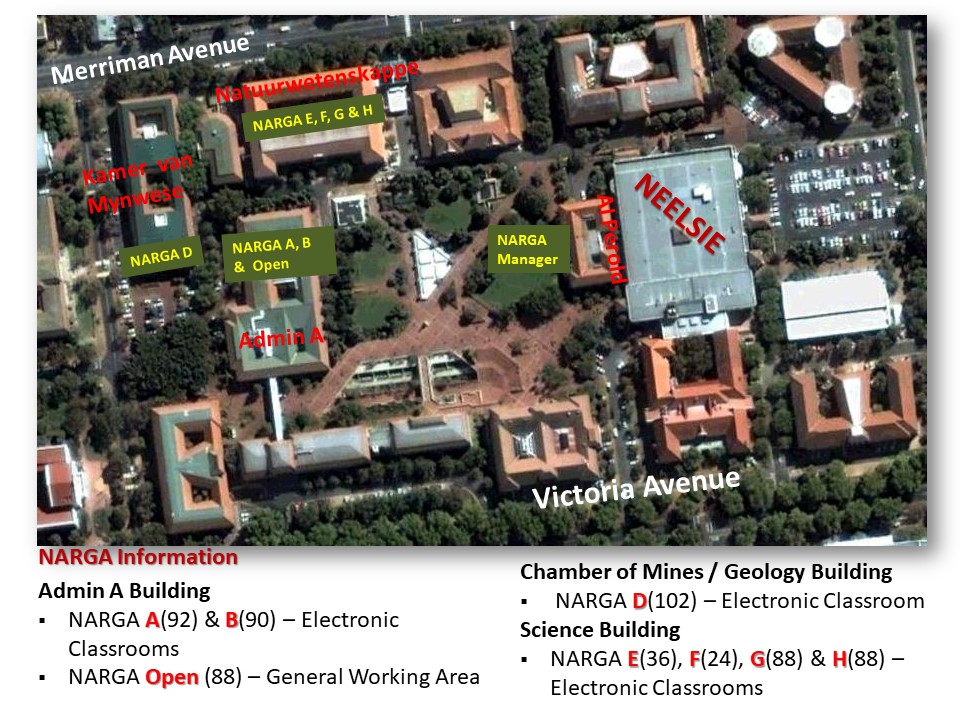
Please note that currently the Open Area capacity is 64 due to the construction happening in Admin A.
Booking Regulation
Booking Procedure
This is only for ad-hoc bookings.
- Step 1 - Make sure here - NARGA Timetables that there is a NARGA Venue available for your timeslot.
- Step 2 - Log a call on the NARGA Service Desk here
- Step 3 - Fill out the following information on the service desk to make the booking:
- Faculty:
- Department:
- Module:
- Activity (underline): Class / Test / Exam / Tutorial
- If Test/Exam, is SUNLearn going to be used?
- No of students/seats needed:
- Software requirements – provide 2 months ahead of time:
- Exam usernames required and number? (When students must not login with their own credentials):
- Date/s:
- Time/s:
- Preferred venue:
- Contact Person:
- Tel no:
- E-mail:
- Instructor:
- Support Needed during office hours: On Call / On-Site / None:
- Support Needed after hours: On Call / On-Site (R430 per hour) / None:
- Provide US numbers of staff that needs to be granted access to NARGA:
Please note that in the case of a test/exam that falls into the normal scheduled booking time, the booking form must be filled in and submitted to inform Narga staff and/or SUNLearn.
Created: 2026-09-04